Interpreting Financial Metrics effectively will enhance objective decision-making. Utilizing the metrics will enrich the overall utility of the Financial Analysis.
Key Concepts
Key Performance Indicators (KPIs):
In Stratex Configuration, various financial metrics can be added to a scoring matrix that can then be included in a scoring model.
Weightings for each metric can be added to create a tailored criterion to an initiative.
Scoring models can then be attached to an investment reason in Configuration to access financial metrics when financial information is inputted.
Key metrics that may be included:
Net Present Value (NPV) is a financial metric used to evaluate the profitability of an investment or project by comparing the present value of its expected cash inflows to the present value of its expected cash outflows.
Positive NPV = Cash Inflows>Cash Outflows (Potentially Financially Viable).
Negative NPV = Cash Inflows<Cash Outflows (Not Financially Viable).
The Stratex NPV calculation is equivalent to the Excel Formula: ‘=NPV’ - (rate,value1,[value2],...).
The Discount rate applied is 1/12 of discount rate specified in the Company Code configuration settings, and the values are the planned expenditure and return by month.
NPVAT is NPV After Tax with the configured tax rate applied.
Internal Rate of Return (IRR):
Internal Rate of Return (IRR) is the effective discount rate that would cause a series of cashflows to produce a NIL net present value. This implies that an Internal Rate of Return greater than the required discount rate would produce a positive NPV.
High/Low IRRs vary depending on the type of capex and industry standards for acceptable ROIs
Higher IRR = Substantial returns, likely to exceed minimum acceptable rate of return, possible higher risk, attractive investment.
Low IRR = Modest returns, possibly not exceeding minimum acceptable rate of return, possible low risk, consideration of strategic alignment should occur.
The Stratex IRR calculation is equivalent to the Excel Formula: ‘=IRR’ - (values, [guess])
In Stratex, IRR can be calculated on EBITDA, Net Profit, nominal cashflow or discounted cashflow. IRR is calculated on a monthly basis, and that is converted to an annual return on a Simple (multiplied by 12) or Compound return basis ((1+i(monthly))^12-1) as specified in Configuration Settings.
Payback Period is a financial metric used in capex management to assess the time it takes for an investment to recover its initial capital outlay through the value it generates.
Lower payback period suggests initial expenditure is recovered quickly; thus, a project becomes profitable sooner.
In Stratex, Payback period can be calculated based on EBITDA, Discounted EBITDA, nominal cashflow, or discounted cashflow. Payback period is calculated by determining the number of years and months required for the initial investment cost to be recovered. For example, an initiative’s returns might exceed the initial investment after 28 months, resulting in a payback period of 2.3 years.
NOTE: In the Financial Analyses configuration settings, an admin will be able to set how the payback period will be calculated. (Cashflow is the method most commonly used).
Profitability Index (PI):
Profitability Index (PI) is a financial metric used in capital expenditure (CAPEX) decision-making to assess the attractiveness of an investment by comparing the present value of its expected cash inflows to the present value of its initial investment cost.
The formula for PI = (Investment+NPV)/Investment
PI>1 = Profitable investment
PI=1, Investment breaks even
PI<1 = Not Profitable investment
In Stratex, PI Investment Costs include all (CAPEX + OPEX) investment costs.
EBITDA (Earnings Before Interest, Tax, Depreciation and Amortization):
Represents a company's operating profitability before accounting for non-operating expenses, financial costs, and non-cash expenses related to depreciation and amortization.
Although a highly beneficial operational metric, EBITDA does not account for cashflow measures of a project.
In Stratex, the EBITDA metric is the total nominal return from the initiative excluding Interest, Tax and Depreciation.
NOTE: This metric does not include investment costs in calculations.
Cashflow:
The cashflow metric is the net inflows and outflows of cash for an investment project.
Note the within Stratex, costs are planned in the period they are expected to be incurred to facilitate variance analysis. For multi-period duration activities, costs can be allocated to the start, period, end period, or spread evenly by period.
Actual cashflow may only occur in accordance with vendor payment terms. Stratex does not currently model or track these physical payments.
The planned cashflow schedule by period is available as a tab in the Financial Analysis.
Depreciation:
Depreciation represents the devaluation of an asset over its useful life.
Most tax regimes only allow for tax deductions on asset purchases based on this periodic depreciation.
The tax allowances on future depreciation are termed the “Tax Shield” and serve to reduce the Net Present Value After Tax (NPVAT) of an investment.
In Stratex, depreciation rates are base on Depreciation Classes which provide the standard useful life and depreciation method.
The planned depreciation schedule by period is available as a tab in the Financial Analysis.
Should there be no residual value for an asset, the depreciation KPI will be equal to the total capex amount.
Depreciation beings at the completion of an asset's period, except for leases which depreciate from commencement.
Tax:
The tax rate can be inputted in configuration->companies.
Returns are taxed depending on the company tax rate and depreciation of assets incurs tax reductions.
In Stratex, the Tax amount is automatically calculated on Depreciation and any identified investment and return Opex that has been planned.
The tax payment schedule by period is available as a tab in the Financial Analysis.
Cash Movement KPIs:
Cash movement KPI’s track the inflows and outflows of cash related to an initiative, but that do not impact the investment cost or accounting result.
Cash Movement Investment (CMI):
CMI are cashflows related to the Investment.
Cash movement inflows related to an investment may result from funding activities including delayed supplier settlements.
Cash movement outflows related to an investment may result from down-payment deposits or settlement of liabilities.
Any cash movement (from the financial analysis) under investment (expenditure) should sum to the CMI.
Cash Movement Return (CMR):
CMR are cashflows related to the expected Return from an initiative.
Cash movement outflows may result from activities that worsen liquidity such as an increase in stock or accounts receivable.
Cash movement inflows may result from activities expected to improve liquidity such as a decrease in accounts receivable.
Any cash movement (from financial analysis) under the return element will sum to CMR in Stratex.
Net Profit
Net profit represents the financial gain or loss for a business after accounting for all expenses, including capex investments, opex, taxes, and other deductions, from total revenue.
In Stratex, net profit is calculated by year and in total on the fiscal year tab of a financial analysis.
ROI (Return On Investment)
Return on investment is a common metric used in capital planning.
ROI is calculated by using discounted values pre-tax.
Financial Analysis Tabs:
For financial analysis' assembled on Stratex, tabs including cashflow, depreciation, interest, tax, and discounted cashflow can provide a more detailed insight into some of the key KPIs above.
Cashflow:
The cashflow spreadsheet on Stratex displays cash inflows and outflows AFTER tax.
Positive values include the tax deductions on depreciation of assets, and negative values represent cash outflows due to various expenditures.
NOTE: Cash movements are not taxed as they are deemed to not be operational income or expense.
Depreciation:
Depending on the Depreciation method selected for the ‘investment’ section, a straight-line depreciation will occur for all capex from the initial expenditure date.
Total Depreciation = Total Inv. Capex (One of the metrics above each tab).
NOTE: If capex is ‘per period’, as expenditure increases, depreciation will increase accordingly.
Interest:
The interest tab will contain all interest paid on leases in Stratex.
As the principal amount decreases, the interest will decrease as it is a specified percentage of the remaining principle.
Tax:
For simplicity, Tax calculations in Stratex are applied to activities in the period incurred.
Tax deductions are automatically applied to depreciation charges calculated on an investment, and are shown as negative values (tax savings).
Tax is calculated on all Investment Opex.
Tax is calculated on all Return inflows and outflows (except for Cash Movements).
Discounted Cashflow
Similar to the cashflow tab, a discounting formula is applied to each month to give the present value of cashflow in each period.
Cashflow is discounted by determining a monthly discount rate from the required company discount rate, divided by 12:
i(monthly) = i(annual)/12
The cashflow for each month is discounted using the following formula:
Discounted Cashflow(period n) = Nominal Cashflow(Period n) / (1+i(monthly))^n
Administration Capabilities:
In Stratex, a scoring matrix can be formulated by an administrator to facilitate the combination of any of the available KPIs. Common metrics include:
Profitability Index (PI)
EBITDA (Earnings Before Interest, Tax, Depreciation and Amortization)
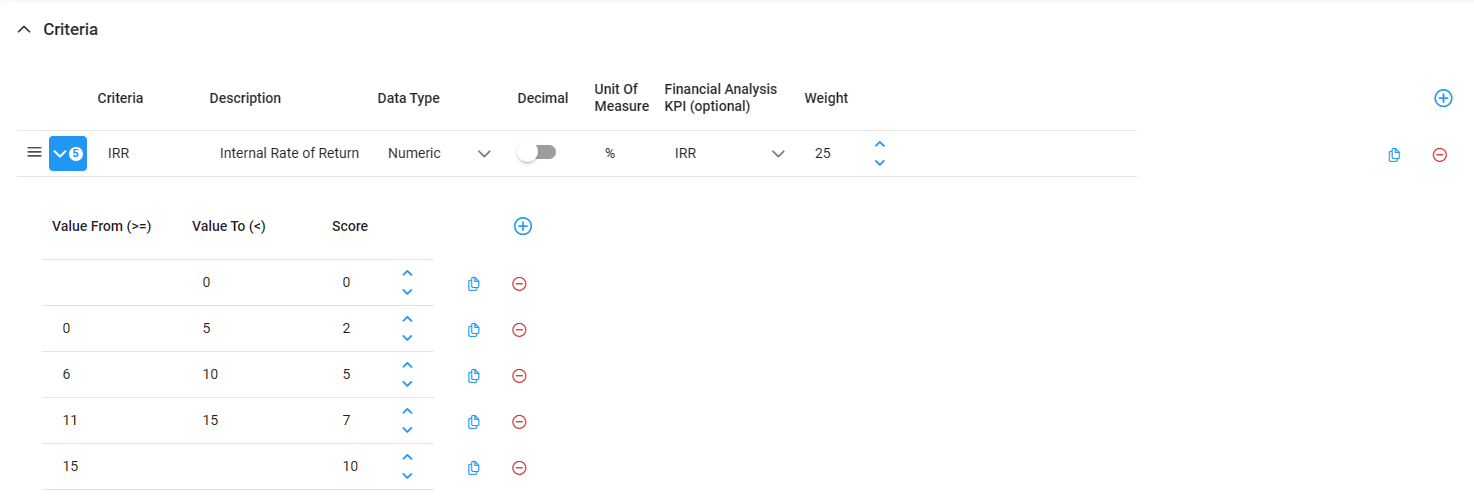
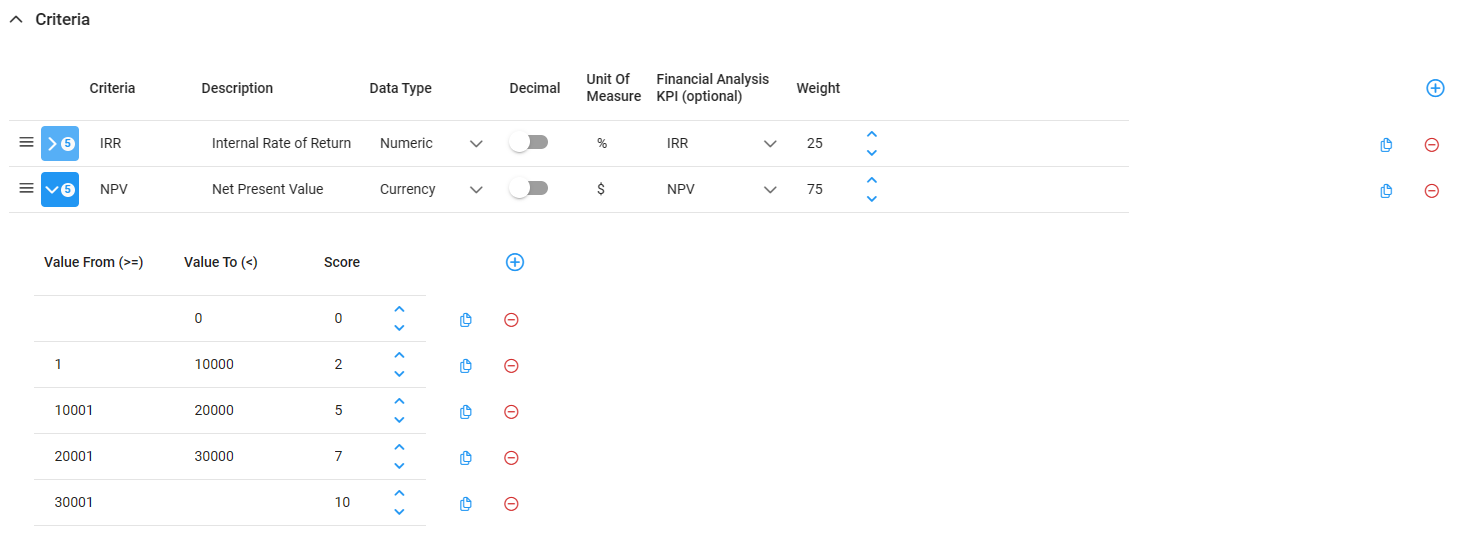
For example, if IRR and NPV are the two desired metrics, to link them to the benefit score would require an admin to assign scores to various values and weight each metric’s score as below:
IRR Example (25% weighting):
NPV Example (75% weighting):
NOTE: If a financial analysis was done externally to Stratex, inputting the values for each metric is still possible, and will ensure that the initiative benefit is consistently evaluated.
Stratex financial KPI’s are calculated on a monthly basis, based on the actual timing of the planned investment and return
In Stratex, Depreciation is calculated on each capital investment cost from the month after their completion (with the exception of leases that are calculated monthly)
In Stratex, Tax is reflected in the month that depreciation or operational expenditure or income occurs.