Approve a Portfolio Request to allocate budget to the included initiatives.
All organizations must decide how to allocate their scarce capital resources to initiatives that are the most important. Within Stratex this process combines a top-down and bottom-up approach.
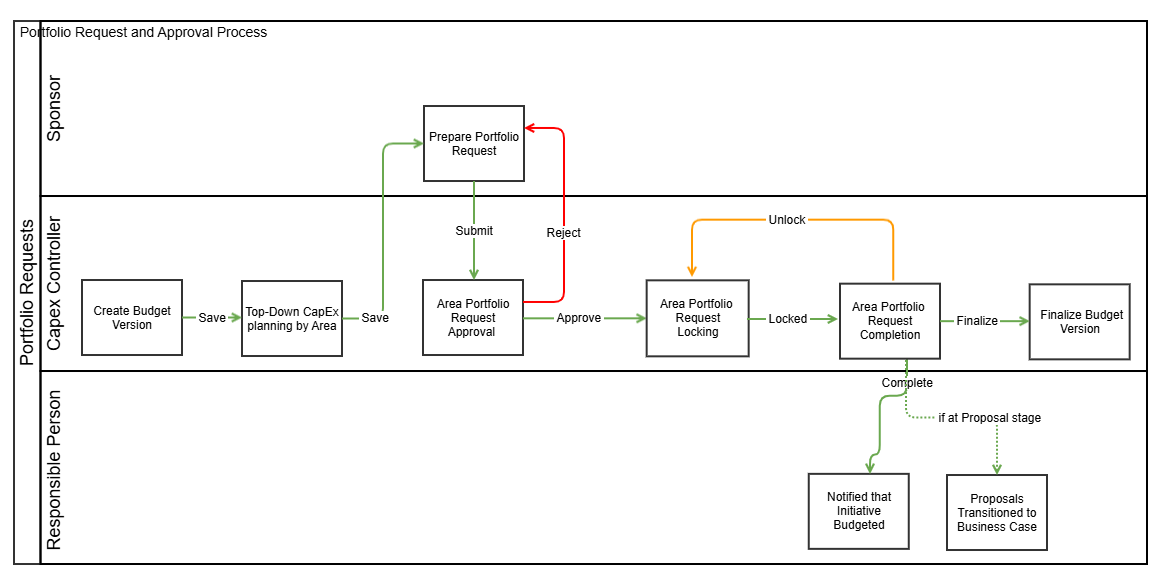
The Capital Controller initiates the budgeting process by creating a Budget Version. They then plan the allocation of capital by Area and Investment Reason (e.g. Sustenance vs Growth) in line with overall strategic priorities.
It is the responsibility of Sponsors to prioritize the initiatives to be included in the budget for their Areas. The selection and request for approval of priority projects is managed through portfolio requests. The capital controller will approve or reject individual portfolio requests with reference to planned top-down capital allocations. Once all area capital allocations are approved, the capital controller completes the budget version, and all initiatives are updated with the budgeted amount. If an initiative is at the Proposal Stage, it will automatically be transitioned to the Business Case stage on budget version completion.
Key Concepts
Budget versions are managed by the Capital Controller. New portfolio requests can only be submitted once a new budget version has been opened.
Capital budgeting is done by year. For multi-year initiatives, the planned expenditure will need to be included in each budget year.
Capital Controllers allocate a planned capital expenditure target by area and investment reason based on strategic priorities.
Portfolio requests are submitted by Area.
Only the Capital Controller can approve portfolio requests.
The Portfolio Requests of all Areas must be ‘Completed’ before the Budget Version is ‘Finalized’.
If an area’s request is rejected by the Capital Controller, it must be resubmitted by an area sponsor.
Only when the budget version ‘Completed’ is the Budget on each included Initiative updated.
Relevant initiatives will then reappear in ‘My Worklist’ for the involved personnel who can then request for a manager review.
Capital allocation is planned and requested in Local Currency. Portfolio Approval is however always presented in Group Currency. The approved budget amount on initiatives is in local currency but reported at standard planning exchange rates.
Budget allocation can be done as a group or individually by areas.
Capex Controllers may apply a budget override to allocate more or less funding to an initiative than originally planned.
Instructions
Click Manage> Portfolio Approval from the menu.
Select the relevant budget year version. If no budget version is active for a year, it is not possible to submit or approve new Portfolio Requests for that year.
All Areas are displayed as per the enabled Budgeting/Planning area together with:
Current status of the Portfolio Request for that Area (Outstanding, Submitted, Approved, Rejected)
Targeted capital allocation at that level including subordinate Areas.
Total Requested capital allocation at that level including subordinate Areas.
Planned capital allocation for that individual Area.
Requested capital allocation for that individual Area.
Target Override - the amount by which the Requested Amount is approved to exceed the Planned Amount. (Note: Target Override cannot be entered for unplanned areas)
Action buttons: Approve and Reject
Comment (to accompany any Rejections)
Drilldown on the Requested amount of an Area by clicking on the requested amount to view the list of included projects. Note that this can be done at Area level or at Total level.
Click the Approve or Reject button for each Area’s Request (one or multiple). Provide a Comment (especially for Rejections).
Click Submit to Action the Portfolio Requests as selected.
Click Lock to ensure no changes are made to initiatives which have been included in the Approved Portfolio Requests.
Click Complete to budget the Portfolio Requests which are locked and distribute the budget to all included initiatives.
If necessary, Portfolio requests can be Rejected once completed. This will enable Sponsors to re-select initiatives to be budgeted and resubmit.
Once All Areas are Completed, Click Finalize to finalize the Budget Version.
Only Capital Controllers can approve/reject Portfolio Requests.
All areas must be approved before locking, and all areas must be locked before completing.
If needed, you can filter the areas by clicking the filter icon next to the area header.
Capital Allocations are planned and approved at every level of the Organizational Structure.
For example, it is possible to plan and approve budget for initiatives at both the Manufacturing Area and for each subordinate Plant.
If you receive a lock error, click the error message to see which initiative is locked and by which user. Remove the initiative lock to successfully lock the area.
Capex controllers can override an initiative’s budget by accessing the initiative drilldown for the area and entering a value in the ‘Budget Override’ column, setting an amount different from the requested budget.