The Workflow Monitor gives the Administrator a list of all Initiatives, currently going through the Delegation of Authority workflow, which have been impacted as a result of changes to the workflow configuration rules. These changes can be caused due to the following reasons after the DoA process has started:
Workflow configuration has changed.
Participants have changed.
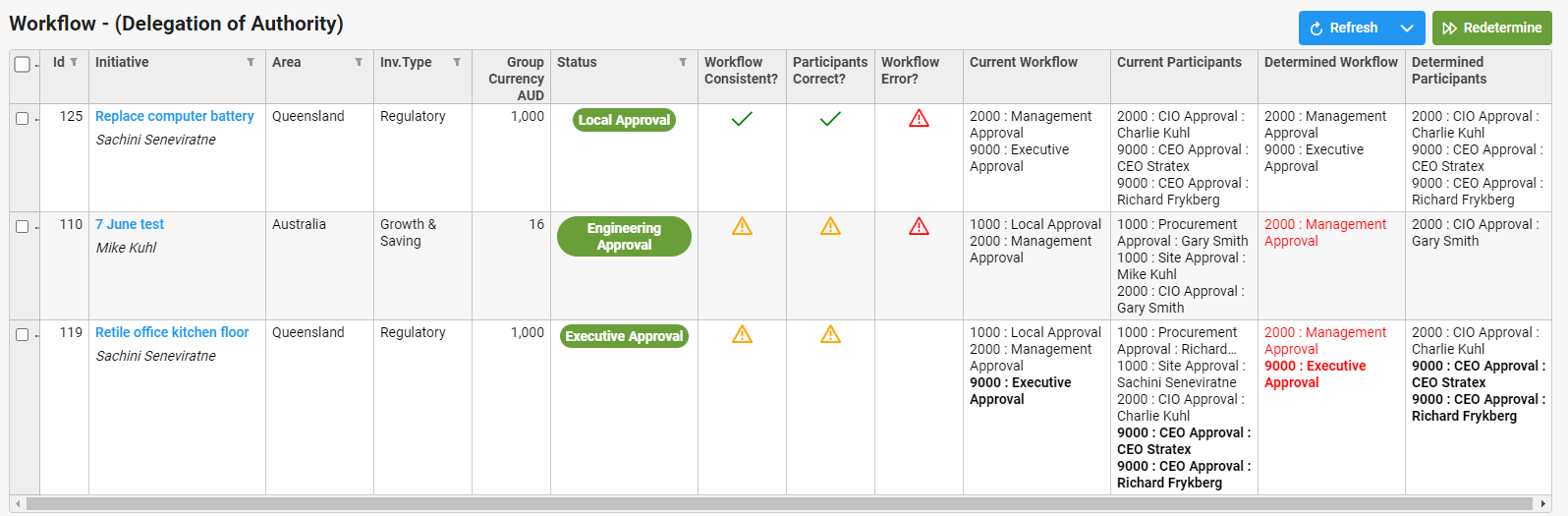
For any Initiative (or multiple initiatives) that has a difference determined in the workflow, the Administrator can select them by clicking on the box on the left of the initiative(s) and then clicking on the Redetermination button top right. This will then rectify the workflow changes for the Initiatives and have it follow the new path, routing to the correct people.
It is important to note that this redetermination depends on where the Initiative is in the workflow. If, for example, the Initiative is at the 5000 sequence level and a change (workflow, participants or status) is made to the 2000 sequence then it will not go back to that level but if a change is made at the 5000 or above sequence levels then it will follow the new workflow and participants.
Workflow Changes
In the screenshot above, Initiatives 110 and 119 have had their workflow changed since starting. Under Current Workflow one can see there used to be 1000: Local Approval but under Determined Workflow this step has been removed. The revised workflow is now highlighted in Red. Select initiatives affected by clicking on the box next to the Initiative ID and select Redetermine to rectify the workflow and Participants.
Participant Changes
Where the Participants in the workflow have changed or the workflow has changed to eliminate or add participants, this will be highlighted in the Participants Correct? column. Select initiatives affected by clicking on the box next to the Initiative ID and select Redetermine to rectify the Participants.
Workflow Status Changes
In the screenshot above, Initiatives 125 and 110 have had their status changed since starting. Where the Status of an Initiative has changed an error will appear in the Workflow Error? column as per above. Select initiatives affected by clicking on the box next to the Initiative ID and select Redetermine to rectify the Status.