What is Stratex Online?
STRATEX is a tool designed to assist in the identification, evaluation, selection, budgeting, approval and monitoring of initiatives that will help you achieve your strategic objectives sooner, at lowest cost and with least risk.
Initiatives typically incorporate new capital expenditure (CapEx) and operational expenditure (OpEx) to sustain, grow, or transform your organization for the future. Stratex helps you prioritize and choose the most strategically aligned, urgent, high value and low risk initiatives within your resourcing and funding capacity, obtain executive approvals, and monitor successful execution of these projects to sure that anticipated benefits are realized.
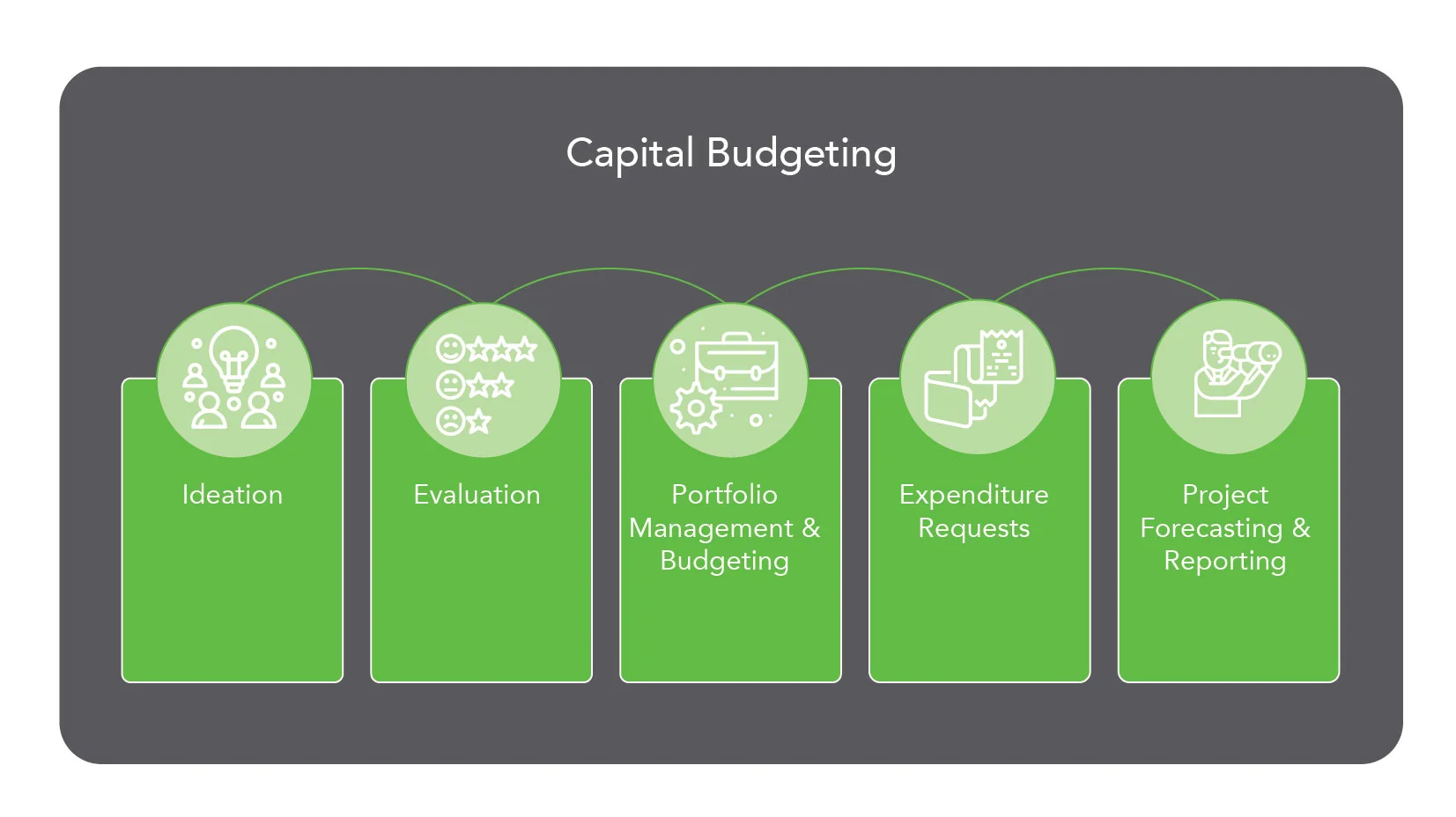
Process Overview
Stratex Online allows you to identify and communicate your strategic objectives for every Organizational Area. Strategies may be a combination of financial (such as revenue growth) or non-financial (such as reduction in greenhouse gas emissions).
An initiatives typically start as an Idea to address current threats and opportunities with respect to achieving the strategic objectives. The Area Manager will assess the initial viability of this idea and approve an investment Proposal to be prepared. Investment proposals are then evaluated, prioritized and included in a Portfolio Request in line with your human resource and financial capacity. The central budget controller reviews these requests and when satisfied the consolidated portfolio of projects, in group currency, is achievable, will approve the initial Budget allocation to these items.
Once an initiative is budgeted, or directly for urgent unbudgeted items, a more detailed Business Case is prepared for the approval of Capital Expenditure. A business case will normally include a Financial Analysis of required investment and return cashflows to produce key financial metrics such as Net Present Value and Payback Period. When the business case is approved in accordance with the organization’s delegation of authority policy, the initiative is transitioned to the Project stage with an approved expenditure amount by Budget Year.
During the Project stage, Actual costs are accumulated and Forecasts prepared to help monitor the likely total cost and timing of cashflows. Key variances, include Foreign Exchange rate variances, are calculated to help executives monitor by exception, and take timely action to redirect resources as required. Supplementary funding requests may need to be approved during this phase.
On completion of the project, the initiative is transitioned to Active stage and resultant fixed assets identified.
Initiative Evaluation and Scoring
Stratex Online helps you apply a standardized and rigorous evaluation and scoring methodology to efficiently and effectively prioritize initiatives. Initiatives are classified by Investment Reason and appropriate scoring models are applied to generate initiative comparison scores as described below.
Organizational Area
All initiatives are assigned to both a benefiting and sponsoring (funding) organizational area. Initiatives could benefit the organization as a whole, or be targeted to individual business units or departments. Within Stratex Online the Strategic objectives, Roles and Budget capacities are maintained by Organizational area and these drive the strategic evaluation, workflow and budgeting processes.
Investment Reason
Initiatives are classified by a primary Investment Reason to facilitate a like for like comparison and appropriate scoring methodology. Typically Investment Reasons would include Replacement, Growth, Transformation, and Sustainability.
Dimensions
Stratex Online has four standard scoring Dimensions: Urgency, Benefit, Confidence and Alignment. Urgency assesses the risk of not undertaking an Initiative and considers both direct loss and opportunity cost. Benefit evaluates the relative value or return expected and can be either a Quantitative metric or a Qualitative assessment. Confidence measures the relative risk of delivery with a low-risk initiative achieving a higher score. Alignment measures the degree to which the Initiative addresses the Area’s strategic objectives.
Scoring Model
The Scoring Model determines which Dimensions are assessed, at what stage, how they are evaluated, and how the respective scores are weighted to produce an Initiative Ranking score (out of 10). For example, at Idea stage, none of the dimensions may need to be formally evaluated, whereas at Investment Proposal stage, benefits may be qualitatively assessed and at Business Case stage, the benefits may be quantitively assessed based on a detailed Financial Analysis. Each constituent score is derived by the application of suitable Scoring Matrices.
Options
Initiatives contain general assessments (Problem and Urgency) as well as assessments applicable to the solution Options. More than one option can be identified to deliver a solution, but all initiatives must have a preferred option. Each option will be independently scored. The preferred Option can be changed, and this will likely impact the overall score.
Initiative Stages and Workflow Routing
Stratex Online allows Initiatives to progress through three front end loading Stages at which data can be accumulated and scoring undertaken, namely: Idea, Proposal & Business Case. Stratex Online allows for the process to be started at any Stage meaning an Organization can progress an initiative through all three stages or elect to start directly from a given stage. The level of detail and scoring methodology applied at each stage can be highly customized.
Workflow
The transition between stages is controlled via automated workflow. The general process flow is from Person Responsible to Area Manager to Sponsor with each participant able to progress or return the Initiative based upon their assessment. Participants are notified, via email, when an initiative is ready for their review. Only the current workflow assignee is able to edit or delete the Initiative.
Users can access their assigned initiatives via their Worklist. The Worklist lists all Initiatives which they are responsible for actioning, giving the general details and scoring associated with those Initiatives as well as the stage of each Initiative.

Idea
This is intended to be the first and simplest Stage for registering a new Initiative. An idea is captured with minimal detail, costing or scoring and is evaluated before any significant effort or cost is expended in developing the Idea. The intention of this stage is to capture as many ideas as possible but filter out the non-viable ideas before resources are spent on developing them further.
Proposal
An Investment Proposal is created in support of portfolio management and budget allocation. An initiative is automatically transitioned to this stage when an Area Manager approves an Idea. Subject to organizational requirements, initiative scoring is performed to assist with the prioritization of initiatives.
Business Case
Capital Expenditure Requests are supported by the Business Case stage in Stratex. This is the final stage all Initiatives must go through to be approved for project expenditure. For growth and savings projects, where the financial benefit is an important consideration, a full Financial Analysis is often completed at this Stage. On the other end of complexity, some asset purchases are low value and the system can be configured so that they progress to the final budget allocation stage with minimal detail or scoring being required, so as not to over-burden or delay the process.
Project
Initiatives at the Project Stage are in-progress. Initiatives may be in the Project Stage for a short-time only awaiting procurement and receipting of capital items, or for many years in the case of major capital construction works. During the Project stage, actual costs incurred are accumulated, and future expenditure forecast. Re-estimations can be performed, and supplementary budgeting and approvals sought if required. On completion, initiatives transition out of the Project stage to the Active stage. It is possible for an Administrator to start an Initiative at the Project Stage but this would typically be used to load historical initiatives or in exceptional circumstances.
Active
Initiatives are categorized as being in an Active Stage once the required investments have been made and the project is technically completed. On transition into the Active stage, any created assets are identified and valued.
Portfolio Requests
Initiatives which have been approved by a Sponsor at Proposal stage are ready to be selected for budgeting. Sponsors access the Portfolio Requests page to select initiatives they want to include in their annual budget per budget year. Sponsors can see their budget capacity per area and can either manually select initiatives for budget or use the auto-maximize tool to auto-select initiatives for budget based on a range of metrics.
Portfolio Approvals
Portfolio Approvals is used by Controllers to approve the budget requested by areas and get oversight of all the areas budgeting decisions. The controller can also adjust budget capacity plans across areas as needed. Once the controller is satisfied with the overall annual budget for all areas in group currency, they are able to complete the budget version and all initiatives which were selected for budget are automatically progressed to Business Case. The budget approval process can be run as many times as required, each time with a consecutive, unique version number. During each, it is possible to include new initiatives previously not budgeted or to amend or even defund previously budgeted initiatives.
Financial Analysis
A Financial Analysis can be produced for any Option. The Financial Analysis identifies the investment cost breakdown and expected returns (where applicable). The Financial Analysis identifies the inter dependencies of elements (work breakdown structure) and associated activities. Activities are either internal or external. Internal activities may include internal labour, materials or equipment with external activities relating to a vendor or customer. The component assets delivered by an Initiative are assigned an asset class which internally derives an expected useful life and tax treatment. The Financial Analysis model in Stratex Online automatically calculates the Net Present Value, Net Present Value After Tax, Internal Rate of Return and Payback Period. These KPI’s can then be automatically factored into a Scoring Model.
Analytics
Initiative Analysis
The Initiative Analytics function provides flexible analysis of all the Initiatives that a user is authorized to view. Users can filter the data selection by any initiative attribute and choose the fields they wish to see to create a desired report, chart, or spreadsheet export.
Financial Analysis
The Financial Analytics function provides flexible financial analysis of key figures by initiative characteristics and period. The key figures supported are plan, budget, approved, actual, forecast to go and forecast. The calculated key variances are planned variance (to forecast), budget variance (to forecast), approved variance (to forecast) and forex variance (related to changes in the exchange rate).
Portfolio Comparison
Portfolio Comparison allows the user to compare two versions of the budget. On the left, the report will be defaulted to the latest budget version. On the right the report will default to the previous version. The delta column identifies the net change between versions. Drilling-down on the delta will identify the added or removed initiatives and changed amounts.
Process Participants
Essential Roles
Stratex Online identifies essential roles related to all Initiatives:
Proposed By is the originator of an initiator, with access to the initiative, but has no direct system workflow interaction.
Person Responsible is the person associated with the delivery of the Initiative and is primarily responsible for maintaining details about the initiative within the system.
Area Manager is responsible for validating and approving all initiatives that will impact their Area.
Sponsor ultimately controls prioritization and budget allocation to initiatives. Sponsors may be the area managers, higher-level executives, or the managers of shared service departments (such as IT).
Optional Roles
In addition, the following roles can be optionally assigned by the Person Responsible:
Collaborators are able to perform all actions that the Person Responsible is able to perform on an Initiative.
Endorsers are able to edit initiatives and provide their Endorsement at any point before the initiative progresses to Expenditure Request. If an Endorser doesn’t endorse an initiative, it can still be progressed as usual.
Delegation of Authorization Roles
For the approval of expenditure, additional roles are dynamically determined in accordance with the delegation of authority workflow configuration. These additional roles may include CFO and CEO approval above certain limits, for example.
Administrator
The Administrator is responsible for all system setup and configuration. This includes Investment Reasons, Scoring Models, Matrices, Master Data, Organizational Structure, Email templates, User Administration and Authorization Groups. The Administrator is also able to view, edit and approve all Initiatives at any Stage. The Controller is normally set-up as an Administrator to facilitate the entire process. Detailed audit trails are maintained of all initiative edits and approvals, and Administrators are unable to manipulate these logs.
Agent Assignment
The individuals in these roles are derived from the organizational area assignment. The system will scale the organizational hierarchy until it finds an individual fulfilling a required role.