Email Templates are used to personalize system generated emails to suit specific organization needs.
Emails are triggered and sent to users for the following reasons and therefore the templates can be edited:
Invite User
Invite Collaborator
Invite Endorser
Initiative Requires Review
Initiative Requires Action
Initiative Approved
Initiative Returned
Initiative Rejected
Initiative Approval Reminder
Administrator Action Notification
Start Portfolio Request
Notify Portfolio Request
Notify Comments
Project Approved
Initiative Active
Initiative Budgeted
Project Approved
Note:
“Initiative Requires Action” will be sent when the action required is by the Person Responsible at the beginning of a transitioned to stage (Proposal from Idea, Business Case from Proposal, etc). This will be sent to the Person Responsible required to action the initiative.
“Initiative Requires Review” will be sent when the action required is at Manager, Sponsor, or Portfolio Manager Review status. This will be sent to the Manager, Sponsor, or Portfolio Manager who is required to review the initiative.
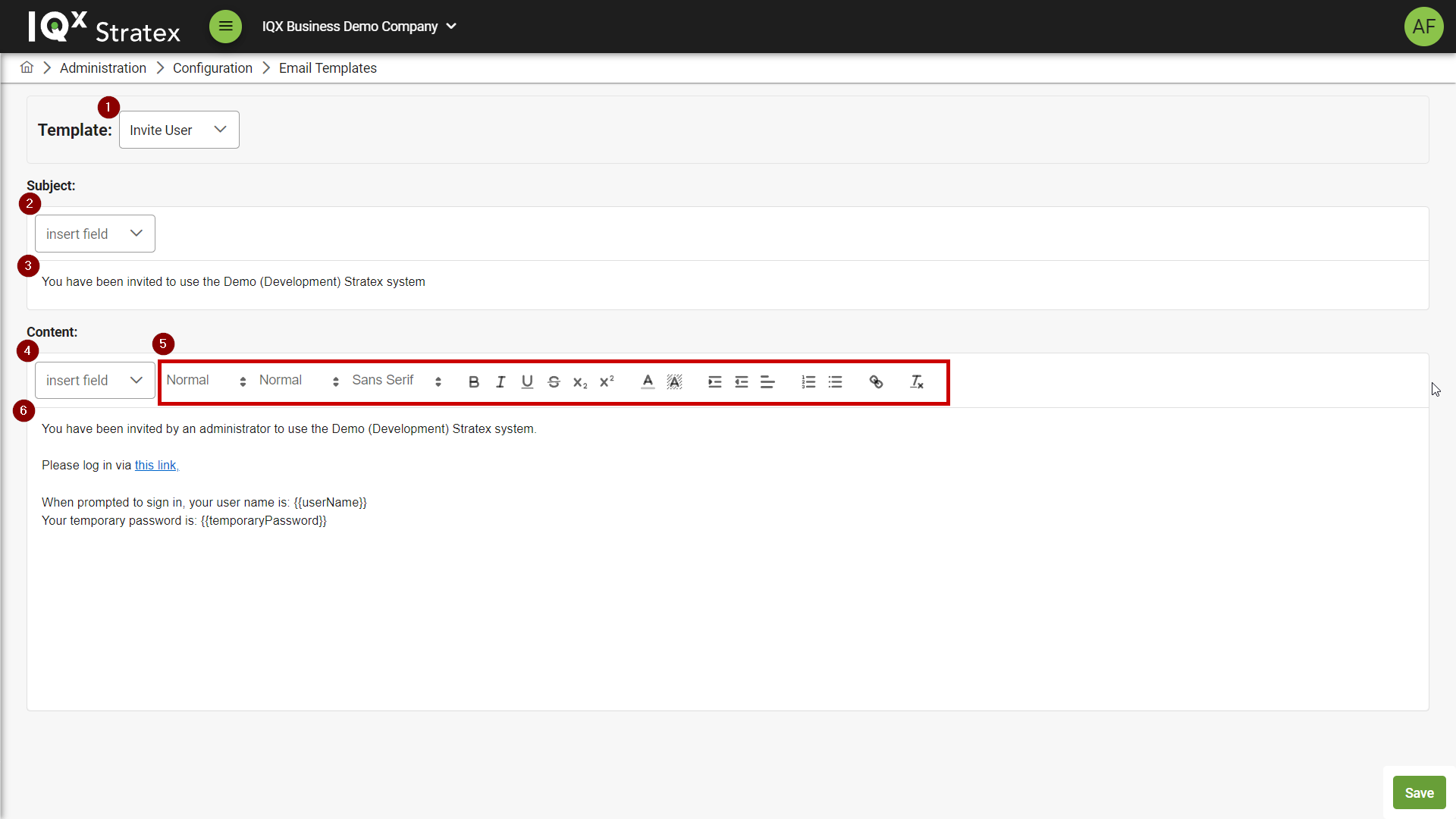
To access the Email Templates page, click on the Email Templates button under the Configuration section of the left-hand navigation bar.
The page consists of:
Template Selection - Select an email template to edit.
Insert Field For Email Subject - Insert a variable related to specific initiatives into the email subject.
Examples include Initiative ID, Initiative Status, etc.
Email Subject - Customise the email subject.
Insert Field For Email Content - Insert a variable related to specific initiatives into the email content.
Examples include Initiative ID, Initiative Status, etc.
Formatting Options - Used to format text in the email content.
e.g. bold, italics, etc.
Email Content - Customise the email content.
Save - Save changes.
Email Template | Users (Role) who receive the email | Users (Role) who are cc’ed in the email |
|---|---|---|
Invite User | Invited User | |
Invite Collaborator | Invited Collaborator | |
Invite Endorser | Invited Endorser | |
Initiative Requires Review | New assignee of the initiative | |
Initiative Approved | Responsible Person | Manager/s and Sponsor/s |
Initiative Returned | Responsible Person | Manager/s and Sponsor/s |
Initiative Rejected | Responsible Person | Manager/s and Sponsor/s |
Initiative Approval Reminder | Current assignee of the initiative | |
Administration Action Notification | Current assignee of the initiative | |
Notify Portfolio Request | Sponsor | |
Notify Comments | Tagged User | |
Initiative Budgeted | Responsible Person | Manager/s and Sponsor/s |
Project Approved | Responsible Person | |
Initiative Active | Responsible Person | |
Start Portfolio Request | Sponsor of the area | |
Initiative Requires Action | Responsible Person | Manger/s and Sponsor/s |