Attachment Variants
The attachment screen variant allows the administrator to define when Attachment Icon are to appear at specific places on an Initiative. It also allows for the configuration of what Attachments Types can be added behind the Attachment Icon. Additionally, these attachments can be set as optional and/or mandatory and can be configured for each stage (Idea, Proposal, Business Case, Project).
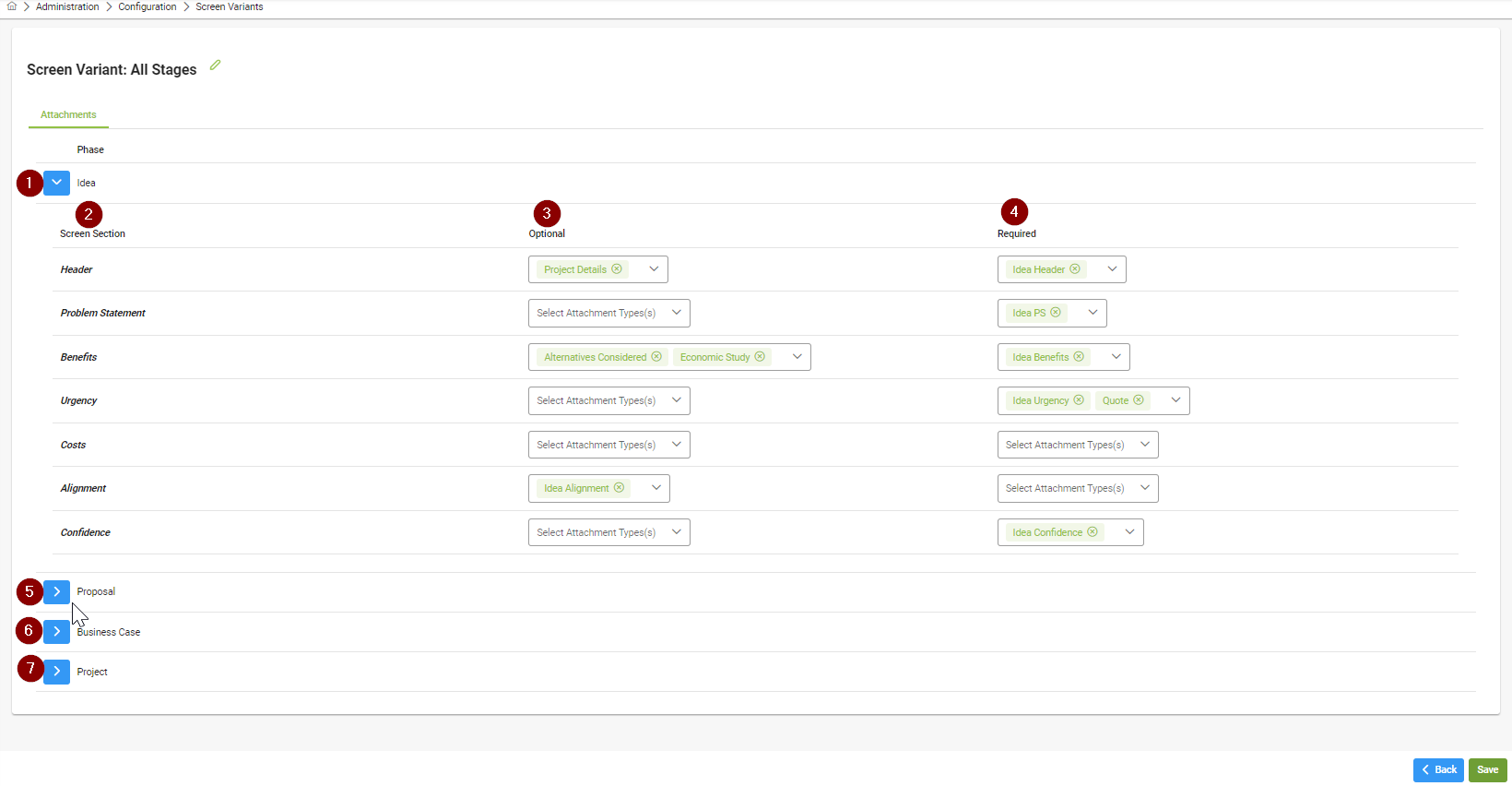
Idea dropdown - click on the dropdown to configure the Idea stage
Screen Section - This corresponds to the section of the initiative screen that the attachments will appear at. For each screen section there can be no attachment, an optional attachment(s) or a mandatory attachment(s)
Optional - To add one or more optional attachments for a screen section, go to the Optional drop down box in the same row as the screen section to be configured, one or more attachment types displayed. Click the attachment type again to deselect it.
Mandatory - To add one or more mandatory attachments for a screen section, go to the mandatory drop down box in the same row as the screen section to be configured, one or more attachment types displayed. Click the attachment type again to deselect it.
Proposal dropdown - click on the dropdown to similarly configure the Proposal stage
Business Case dropdown - click on the dropdown to similarly configure the Business Case stage
Project dropdown - click on the dropdown to similarly configure the Project stage