A key function of Stratex is to help organizations achieve their strategic objectives sooner, at lowest cost and least risk. Within Stratex, managers define their strategic priorities, and initiates can be evaluated accordingly.
Key Concepts
Strategy decomposition by area - for many organizations, the enterprise strategic priorities are reflected in the supporting strategic priorities of the individual areas and departments.
For example, the enterprise strategy may be to increase profitability of the legacy products. The Sales area may then set an objective to increase pricing on legacy products, whilst the Production area may set an objective to reduce per-unit costs.
When evaluating strategic alignment, Stratex presents the strategic objectives maintained for the selected Area. If no specific strategic goals have been defined for an area, Stratex will navigate up the organizational structure and derive the strategic objectives from a superior hierarchy node.
Area Managers are responsible for maintaining the strategic priorities of their area.
Strategic objectives are weighted to reflect their relative importance. This weighting is reflected in the relative size of each wedge of the strategy pie chart.
As strategic priorities change (e.g. more of an emphasis on environmental sustainability), dimensions and their weightings can be updated. Strategy changes are normally reflected in a new strategy so as not to impact previous evaluations. Only one strategy can be activated at any one time.
Strategic alignment can be assessed at any stage, subject to administrator configuration of scoring models.
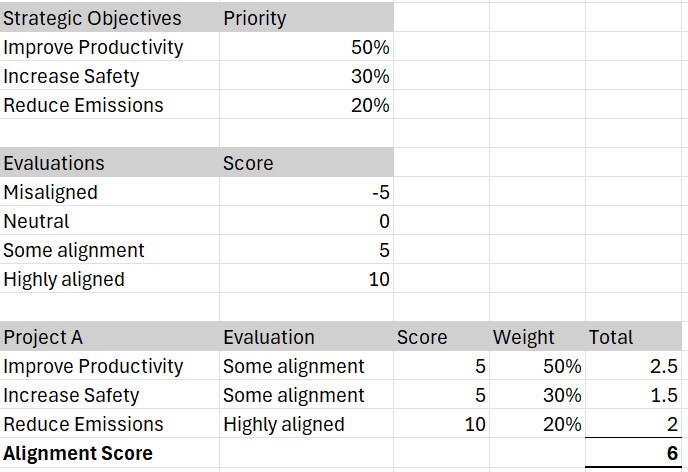
The strategic alignment metric in Stratex is based on the relative weighting of the degree of alignment and the relative importance of the objective.
For example, if a area has the following Strategic Objectives, and the alignment scoring is as indicated, an individual project 'A' will be evaluated based on the weighting of the individual scores as follows:
Global strategies can also be reflected directly in scoring models that are assigned to specific investment reasons. For example, an environmental strategy matrix can be defined that is presented for all areas where the selected investment reason is “Environmental”.
Instructions
As an Area Manager, navigate to Manage > Maintain Strategy.
Click Edit to view an overview of Strategies.
Click Add Strategy to commence definition of new strategic objectives.
Select the Strategy in the top panel and Add Objectives in the panel below.
Assign each Objective a relative weighting, ensuring all objectives add to 100%.
Activate the Strategy in the top panel.
As an Initiator, navigate to View > Display Strategy to identify the relevant strategic objectives of your Area. If required, maintain you User Settings to set a default Area.
When raising an Initiative, if required by the Scoring Model, evaluate the Strategic alignment of your initiative with reference to the strategic priorities of the benefiting Area.
When evaluating Strategic alignment, Stratex will present the strategy of the Area, or if none is maintained, will reference higher-level areas until a Strategy is found.
The strategic alignment score is calculate by both the degree of alignment to Area Strategy objectives and the priority of those objectives.
Related articles